

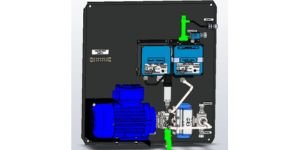
Cleaning the cell is a simple process that requires only a bottle brush and a mild acid such as orange juice, vinegar or cola. These acids are preferred as they are safe to both the operator and the equipment. All power, air, sample and fresh water must be isolated prior to cleaning the measuring cell.
You must also ensure that your sample isn’t actually too dirty for the system to handle. This can often be experienced when the vessel is in high seas as the slop can not separate naturally due to the churning motion of the vessel.
First, the system must be drained of all water. This can be achieved by opening the system-drain valve located at the bottom of the VPC and removing the Autoclean assembly from the top of the measuring cell, both highlighted green below;
The pipework at the inlet and outlet of the measuring cell must then be removed, ensuring that all parts removed are kept safe. These parts are highlighted in green below.
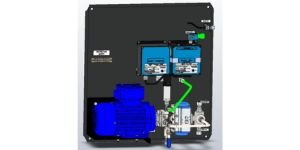
Plug the inlet and outlet of the measuring cell. This can be performed using a small rubber bung or alternatively, refit the pipe highlighted green in an upright position.
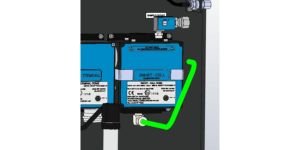
The measuring cell can now be filled with a mild acid such as orange juice, vinegar, cola or the Rivertrace cleaning kit. This is safe to both the operator and the equipment. This should be left for a minimum of 12 hours before cleaning the inside of the glass tube with a soft bottle brush. The measuring cell cover should never be opened to prevent irreparable damage and void of warranty.
Cover removed for illustration purposes. Never remove the cover onboard the vessel
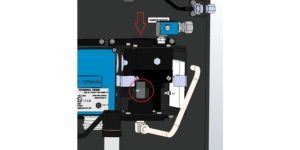
Once the cell is cleaned with a soft bottle brush, refit all pipework and Autoclean. Please note that the Autoclean should not be fitted too tightly. This should be screwed in by hand fully and then backed out by 1/2 to 1 full turn.
Now flush with fresh water for around 15 minutes. This will flush the measuring cell and also properly flush the fresh water supply line to the ODME system which are prone to corrosion / debris build-up through sporadic usage. Once flushed, locate the “Check PPM ” setting from the service menu and ensure the PPM has decreased to a suitable level of 0ppm.
If the PPM reading remains high, a “Reset” of the measuring cell may be required.
Calibration Verification
If you have a satisfactory fresh water reading during these tests and you wish to verify the accuracy of your measuring cell, Rivertrace can provide a “Calibration Check” kit. The check kit is designed to be poured into the measuring cell and will cause a reading of 500ppm +/-10%. The kit is supplied complete with a procedure for crew to perform however we are more than happy to have our trained engineers attend your vessel to carryout the procedure. We will also provide a “Calibration Check” certificate to leave a paper trail of you measuring cells accuracy.